All About Event Badge Design: Tips and Best Practices
August 4, 2026

Imagine that you’re at an event or conference. Someone smiles and walks over to you. You know them, but you can’t remember their name. You start to panic. You might even think about avoiding them and heading for the food table. But if they have an event badge with their name in bold, you can relax and greet them without worring about what to call them. Custom event name badges help reduce social anxiety and have other benefits:
- Provide touchless event entry thanks to the magic of barcodes/QR codes.
- Take some of the awkwardness out of networking (see above!).
- Make it easy to sort attendees into various groups.
- Help event staff determine access through visual ID/QR code scan.
- Enable guests to scan in for lunch, snacks, and cocktail hour.
- Supply data on what sessions or events guests are attending at your event.
- Offer an opportunity to reinforce your brand.
What Kind of Badge is Right for Your Event?
Event badges come in a range of materials and sizes, and the badge you need mostly comes down to how long your event runs and where it’s held. Badges are typically displayed on a lanyard worn around the neck or a bulldog clip.
Badges show up well beyond registration desks, too — see 5 creative ways to use event badges outside the conference room for ideas like icebreakers, press credentials, and party favors.
Paper or plastic?
For shorter, single-day events, badges printed on sturdy card stock are the simpler, more budget-friendly choice. For multi-day conferences or outdoor events like a music festival, plastic event badges cost a bit more, but it’s worth it— they’re waterproof and durable enough to hold up to repeated wear.
What size badge do you need?
Sizes range from a compact card-sized badge up to a tall, narrow style built for lanyards. Check Eventgroove’s full range of name badge sizes to find the best fit for your event.
Does everyone need the same badge?
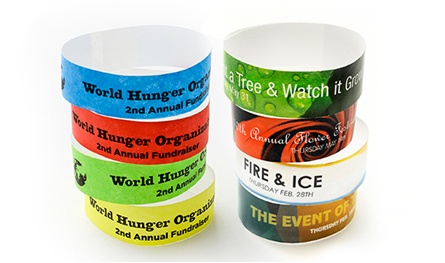
Yes — badges work as much for wayfinding as for access control. Give everyone one, then tell groups apart with color-coding, a different logo treatment, or a printed badge ribbon like “STAFF” or “SPEAKER.” For an extra layer of access control at check-in or backstage, many events add event wristbands into the mix rather than switching badge types entirely.
If you do want dedicated designs for certain groups, VIP badges, conference badges, convention badges, and backstage passes are commonly ordered as their own badge type.
What Should You Put on an Event Badge?
A great event or conference badge should sync with your company’s branding and be easy for attendees, vendors, and event staff to read. At minimum, include:
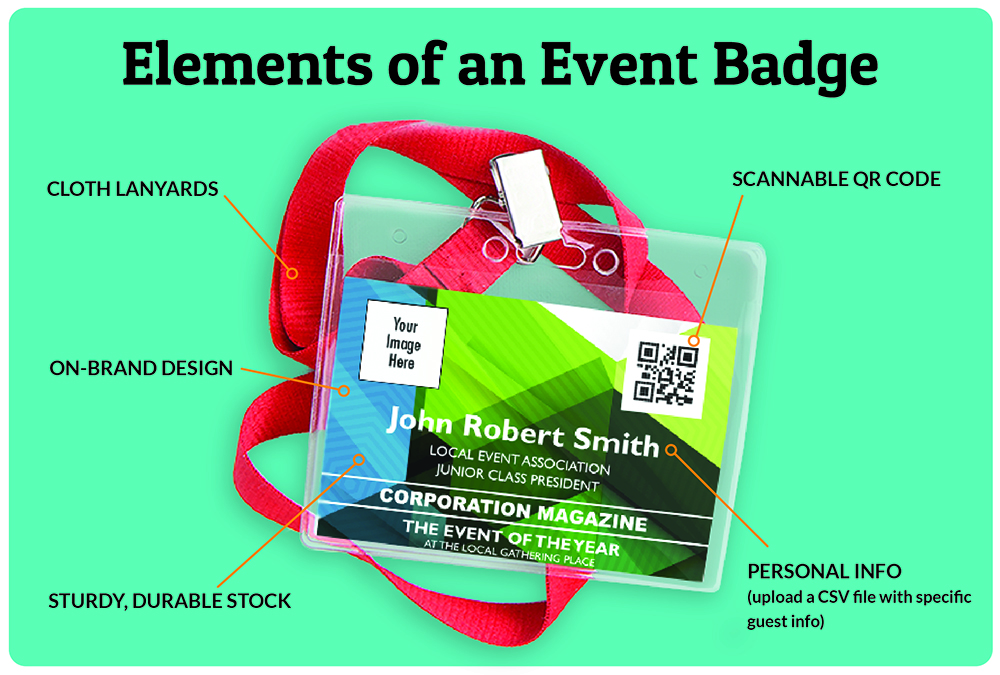
Attendee information. If the badge is for a trade show or conference, the name, title, and company should be clear. In most cases, this means the name is in the largest, boldest font, followed by the title and company.
A QR code or barcode. Place this beneath the attendee information for easy scanning, check-in, and access control.
Your branding. An event badge is an extension of your event and company’s brand, so your logo and/or brand colors should be visible.
Want to see these principles in action? Browse real conference badge design examples for inspiration before you start designing.
How Do You Make Custom Event Badges?
Eventgroove gives you three ways to build yours: pre-designed templates you customize in minutes, our Design Your Own tool for full creative control, or our custom design service if you’d rather hand it off entirely. See the full range of design options to pick what fits your event. Whichever route you choose, make sure your QR codes and barcodes stay crisp and scannable — that’s easier to guarantee with professional printing than a home print run.
Ordering for a larger event? Our planning checklist for ordering conference badges walks through quantities, timelines, and day-of check-in.
Design Best Practices
A great event or convention badge should sync with your company’s branding and be easy for attendees, vendors, and event staff to read. To that end, the following elements should be included in your design:
Attendee information: If the badge is for a trade show or conference, the name, title, and company should be clear. In most cases, this means the name is in the largest, boldest font, followed by the title and company. For other sorts of events, such as a backstage pass for a concert, only the name may be necessary.
Variable QR code and barcodes: This should be presented beneath the attendee information for easy scanning, check-in, and access control.
Branding: An event badge is an extension of your event and company’s brand. Thus, your logo and/or brand colors should be visible! Consider also including your social media handles. If that’s not possible on the front, and you aren’t using the back for sponsorship opportunities, display them on the back. A great way to do this is through a QR code—guests can scan it to access your site, social media links, and giveaways.
How to Design a Custom Badge
Option 1: Team up with a graphic designer
They’ll create badge designs for your various attendee types and add whatever elements you need, such as logos, QR codes, and more. If you need a graphic designer, browse freelance sites such as Upwork and Fiverr. Alternatively, when you work with a professional online printing service like Eventgroove, you’ll generally have the option to work with a design professional. In our case, fees are affordable, and we offer a customer satisfaction guarantee on all print orders.
Option 2: Design and print badges yourself
If you’ve got design skills and a great home or office printer, DIY event badges are possible. However, keep in mind that each QR code/barcode must be crisp and clear, which can be challenging to achieve without professional printing. In addition, variable data can be difficult to efficiently and accurately manage yourself. An alternative would be to create a design using Adobe Photoshop or similar software, then upload your badge’s print ready files to an online printing service.
Option 3: Event badge templates
Templates are an uncomplicated and efficient way to create a great custom event badge in minutes. When using a badge template, you’re working with pre-designed artwork laid out by a professional. All you have to do is fill out your chosen text boxes, add logos, and upload variable attendee data via a CSV file.
Once you finalize your badge design, you’ll need to have it printed! Printing is part of the process if you use one of our event badge templates or engage our design team to create new artwork or adjust an existing template (such as by adding QR codes or design elements). If you’ve made your design elsewhere, you’ll need to have a PDF file ready with bleed included (if you have a full-bleed design). We will take care of all the pre-production setup if you’re working with our team.
Ready to Get Started?
We’d love for you to consider Eventgroove for badge printing! You can count on us for quality print-on-demand products, unparalleled customer service, and fast turnaround.


Back to blog Back to top


